

Enter the user's StarMaker ID to look up information.
How to copy ID on StarMaker App: View Now
How to copy ID on StarMaker App: View Now
App Starmaker is a leading singing and music community platform with features like Online Karaoke, Live Streaming, creating or joining families, and Party Rooms to chat and connect people.
Guide to Checking Starmaker App ID Information
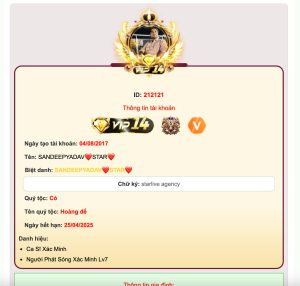
How to Use and Check:
- Visit https://starmaker.id.vn.
- Enter the User ID you want to check.
- The system will return results including:
- Personal information (user) such as level, certifications, VIP status.
- Family details (family) like name, member count, and images.

StarMaker Guide to Checking User ID Information 2025

User ID Information Includes:
- Display Name: You can copy the name if you like it.
- Level:
- Certifications: Icon badges.
- VIP: Check VIP status and hidden VIP levels.
- Profile Picture & Signature: Display profile image and personal bio.
- Noble Status: Type, icon, necklace, and expiration date.
- Pendant:
Family (Group) Information
- Family Name:
- Members: Total/max members. Check Online Members.
- Symbol & Description:
- Family slogan + cover image.
Coming Soon:
– Daily updates of Crazy Monster CD Key codes.
– Create custom avatars with pendant User ID.
Learn More:
– Check Starmaker User ID Information
– Privacy Policy and Terms of Service.
– Contact: [email protected]